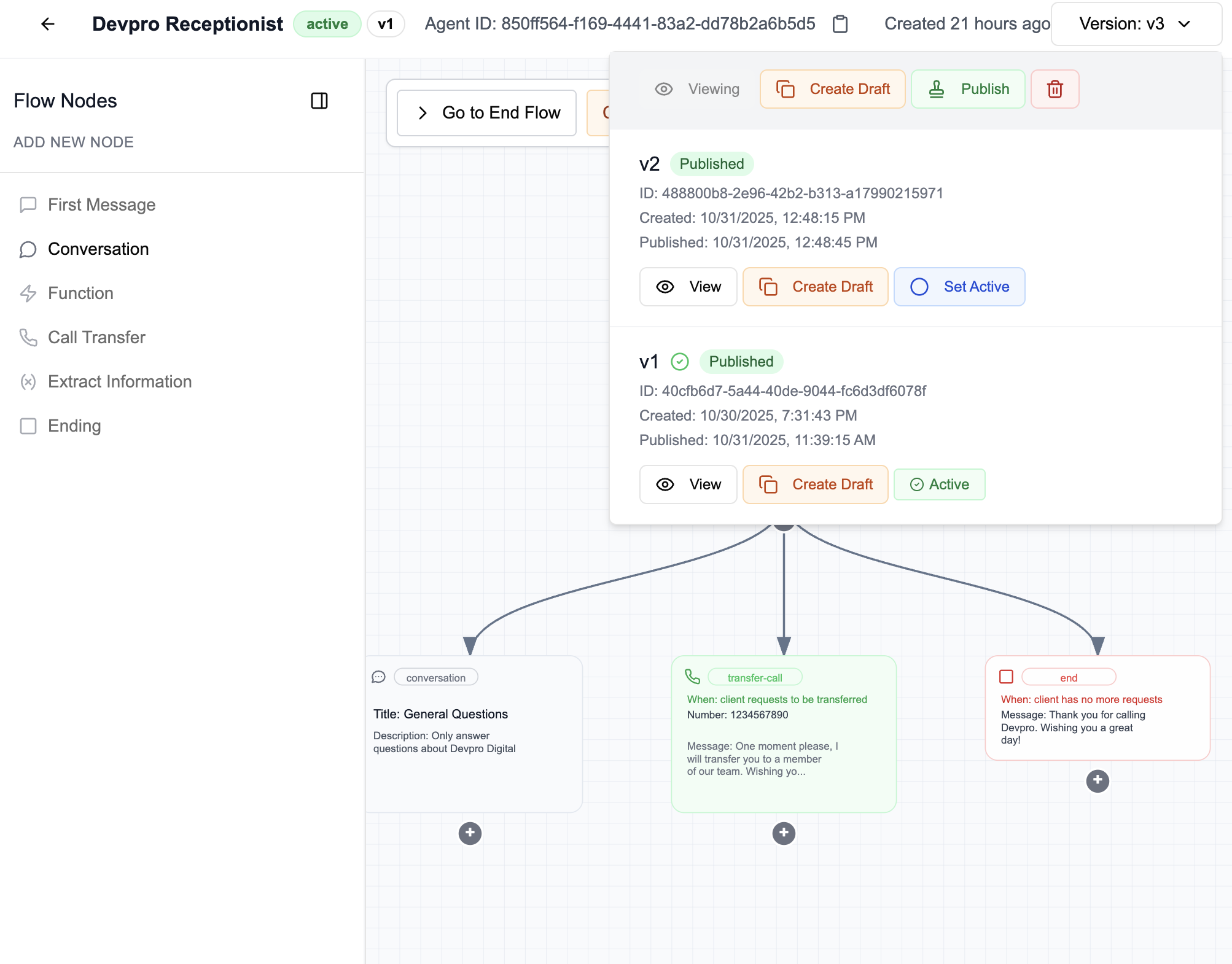
Agent Version Control
Version control allows you to track and manage different versions of your agents. It ensures that in production, only a stable and validated version is used, while allowing continued development in parallel.
Version Lifecycle
1. Draft
- This is the main working environment.
- You can modify, test, and experiment without risk to the production version.
- Use the Test agent button to continuously validate your changes.
2. Create a Version
- Once satisfied with the draft, click Create New Version.
- This creates a save point in the agent's history.
- You can continue to adjust this version and test the agent on the web.
3. Publish a Version
- Click Publish to freeze the current version.
- A published version becomes Read Only: it can no longer be modified.
- This ensures the stability of the agent's behavior in production.
4. Activate a Version
- For your agent in production to use a given version, click Set Active.
- Only one version can be active at a time.
- You can change the active version at any time according to your needs.
Note
Only the active version of the agent is accessible by phone or in production.
Since it can be tedious to create new versions for every change, it is recommended to test on the web during development.
Other Features
- Delete a version to remove an old unused version.
- Create Draft to create a new draft based on a previous version.
- View history to track the evolution of your agent's behavior by clicking View.